
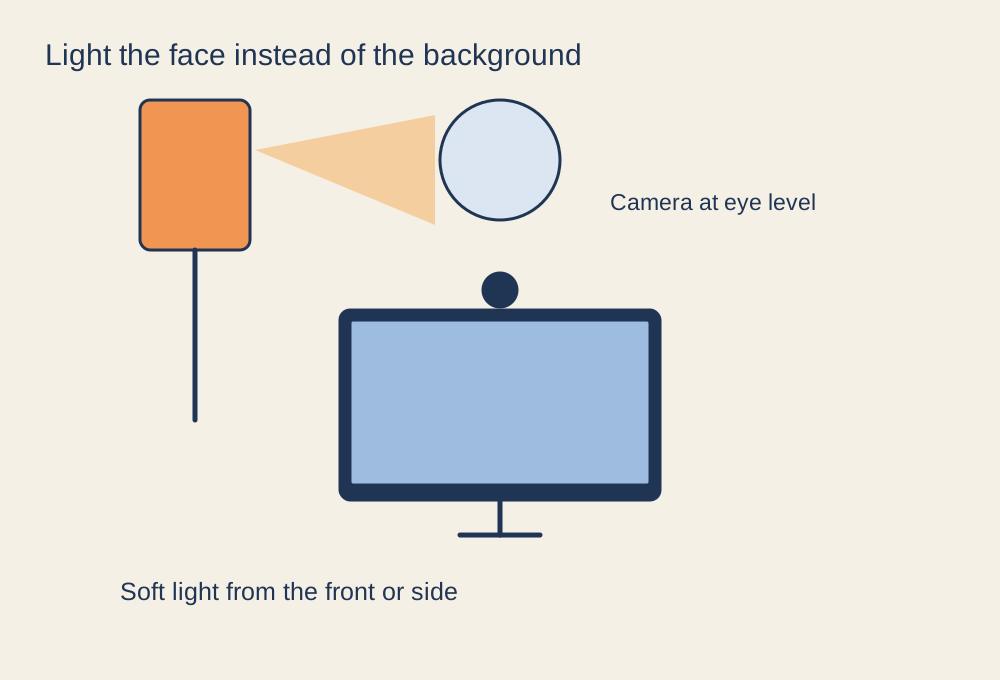
Watch the preview while changing one light
Open the camera preview in the application you plan to use. Look at the face, not just the overall brightness of the picture. A bright window behind you can leave the face dark even when the room seems well lit. A single ceiling light may create strong shadows under the eyes. Move one light or change the window shade and watch the result before adjusting several camera controls at once.
Try a soft light in front of you or slightly to one side, positioned so it does not shine uncomfortably into your eyes. A shaded lamp can be useful; there is no requirement to begin with a dedicated streaming light. Keep lamps and any diffusing material within their intended safe use, rather than covering a hot bulb with an improvised sheet.
Set the camera position
Place the webcam around eye level and frame the area you want people to see. Check the background for private documents, reflections and screens showing personal information. A cleaner frame can often be achieved by turning the desk or moving an object rather than applying a virtual background.
Clean the lens gently according to the maker's instructions. If the camera has focus controls, check that the face is sharp at the distance where you actually sit. Constantly leaning in and out of the focus range can be more distracting than a slightly wider, stable composition.
Check the picture during movement
Once the lighting is stable, try the camera's exposure and colour options if available. Excessive low-light compensation can make motion look smeared, so wave a hand or turn your head in the preview. Avoid fixing a dark scene by increasing brightness until the image becomes noisy while a simple lighting change remains possible.
Record a short sample in the final application. Compare daylight and evening conditions if you use both, because an automatic setting may react differently after sunset. Keep the successful lamp position and camera framing easy to reproduce. A consistent picture is more useful than a single bright test frame that disappears as soon as the monitor shows a dark game scene.
.jpg)