Follow the complete round trip
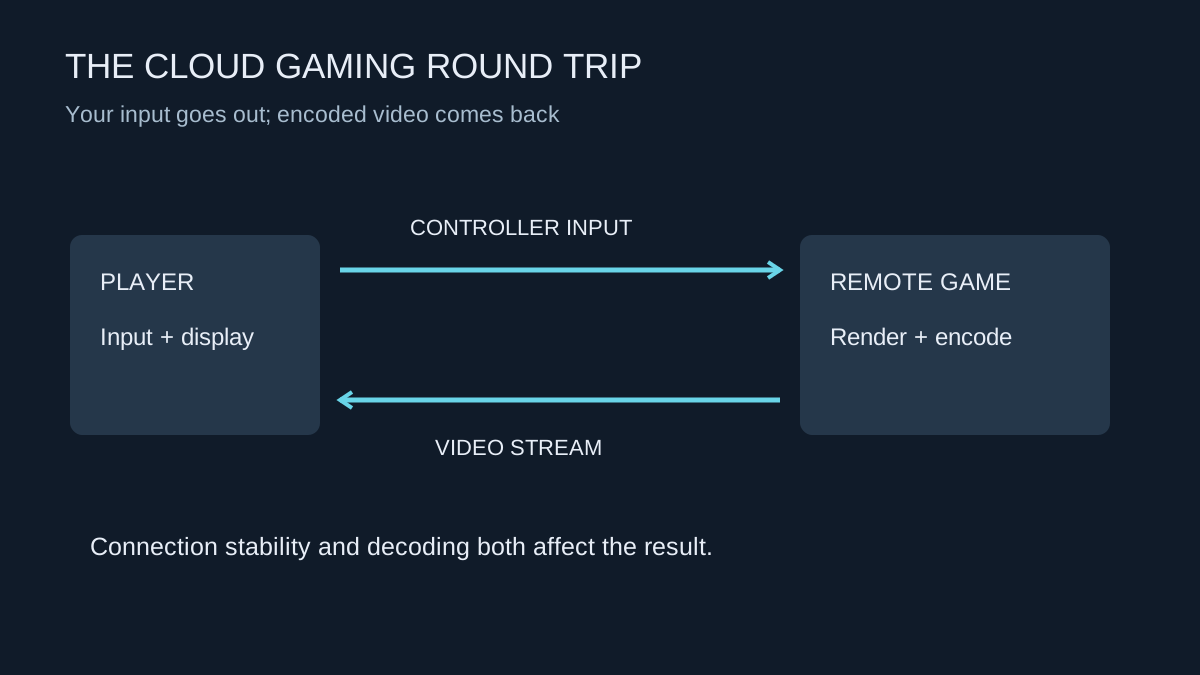
In cloud gaming, the game runs on remote hardware. Your controls travel to that machine, which renders the scene and sends an encoded video stream back. The local device then decodes and displays it. The experience therefore depends on more than how quickly a large file downloads.
Network delay, variation, packet loss, decoding capability and the display all contribute. A powerful remote graphics processor cannot remove the distance to the data centre or an unreliable local wireless link. Conversely, a modest local computer may work well if it supports the service's client requirements and has a suitable connection.
Check the service, not an old generic checklist
Use the current requirements for the service and the specific resolution, frame rate and client you want. Browser and native-app capabilities can differ. A subscription tier may also determine which streaming modes are available. Do not assume that a television app supports everything advertised for a Windows client.
Check the game library and ownership rules separately. A service can require you to own a supported game through a particular store, include selected games in a subscription, or use another arrangement. Availability can change. Confirm the exact title and edition before paying primarily to play one game.
Also check controller, keyboard and mouse support for the intended device. A controller that works with the television's menus may not necessarily work with the cloud app. Test the actual game controls, including buttons used for menus, text entry and any accessibility features you rely on.
Run a trial during your normal playing hours
Begin with the service's built-in network test, then play a representative session. Try a scene with movement, fine detail and the sort of input timing that matters to you. A turn-based game and a fast competitive shooter can expose different tolerances for delay. Your own intended use is more informative than a claim that the connection is good for all gaming.
Use a wired path to the main router where practical for the first comparison. Then test the Wi-Fi arrangement you would actually use. Include an evening when the household is online rather than relying only on a quiet morning result. Record whether quality changes are accompanied by the service's network warnings.
Distinguish stream resolution from the game's internal rendering settings. A clear stream can still show a game rendering at a lower internal resolution; a detailed remote frame can still be softened by compression. Fast-moving foliage, dark gradients and small text can make compression easier to notice than a static menu.
Separate a stream fault from a game fault
If the video becomes blocky while the game's menus still respond, inspect the service's stream or network statistics. If the stream remains clear but the remote game itself reports a low frame rate, changing local Wi-Fi settings may not address that rendering workload. Where the client reports both, record them separately.
Try another supported title and another time of day before drawing a broad conclusion. A problem confined to one game can have a different cause from every stream failing on the same client. Keep the local decoder and app version in the record too; changing devices can alter more than screen size. These comparisons help decide whether to lower stream quality, troubleshoot the local connection or contact the cloud provider about a specific game.
Account for data and interruptions
Streaming continuously transfers video. Check any connection allowance and monitor actual usage during the trial, especially on mobile data. A brief test does not establish the total cost of several hours each evening. Client settings may offer a lower bitrate or resolution, which trades picture detail for a smaller transfer requirement.
Consider what happens if the service or connection is unavailable. A cloud-only arrangement does not provide the same offline fallback as an installed offline-capable game. Session limits, queues and regional availability may also affect when you can play; read the terms of the plan you are considering.
Keep save behaviour in the decision. Verify which account holds progress and whether it can be used with another installation of the game. Do not assume a streamed version and every locally installed edition share saves. If the trial suits your controls, connection, picture expectations and access needs, you have evidence for a subscription rather than merely a promising speed-test result.